SnapStackPaste Won't Open?
macOS is protecting you by default. Allow SnapStackPaste in less than 30 seconds.
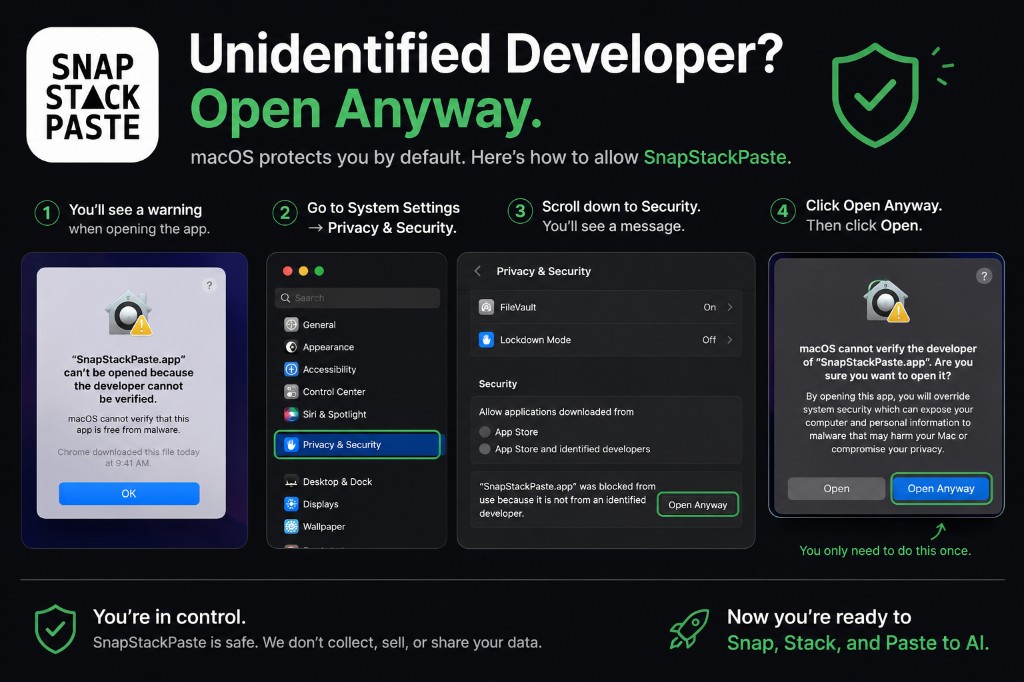
Common macOS messages
Method 1 — Right-click → Open
- In Finder, open Applications and locate SnapStackPaste
- Right-click the app icon
- Choose Open from the menu
- Click Open in the confirmation dialog
- SnapStackPaste launches normally — you only approve once
Method 2 — Privacy & Security → Open Anyway
- Try to open SnapStackPaste once (macOS records the block)
- Open System Settings
- Go to Privacy & Security
- Scroll to Security and click Open Anyway next to SnapStackPaste
- Open SnapStackPaste again — it will launch normally
You only need to do this once.
FAQ
Why does macOS show "Unidentified Developer"?
Apple blocks apps from independent developers by default until you explicitly allow them. SnapStackPaste is safe — approve the first launch with either method above.
What does SnapStackPaste do with my screenshots?
SnapStackPaste stores screenshots locally on your Mac. We do not sell or share your data.